Inputs:
- A polygon feature class
- An ESRI TIN or PolygonZ TIN
- Level for all polygons or field from the attribute table containing the level information.
Outputs:
- A polygon feature class with several new
fields added
- ET_ID - contains the FID of the original polygon
- ET_Status - the classification of the polygon based on its Cut/Fill status
- ET_Cut - the volume of the polygon with a Status = Cut
- ET_Fill - the volume of a polygon with Status = Fill
- ET_Area3D - the 3D area of the polygon
- ET_Area - the 2D Area of the polygon
- All attributes of the original polygons are preserved.
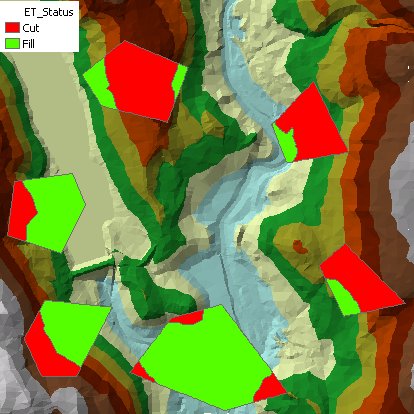
Command line syntax - two different toolbox tools available depending on the type of the input TIN. Check the color coding for specifics.
| ETS_GPCutFillEsriTIN <Input Dataset> <Input TIN> <Out Feature Class> {Level Field} {Level} |
| ETS_GPCutFillPolygonZTIN <Input Dataset> <Input TIN> <Out Feature Class> {Level Field} {Level} |
Parameters
| Expression | Explanation |
|---|---|
| <Input Dataset> | A Polygon feature layer or feature class |
| <Input TIN> | An ESRI TIN layer or dataset |
| <Input TIN> | A PolygonZ TIN (feature class) |
| <Out Feature Class> | A String - the full name of the output feature class. |
| {Level Field} | A String indicating the field name of the input polygon attribute table to be used for levels of the polygons |
| {Level} | A Double indicating the level for all input polygons |
Scripting syntax
ETS_GPCutFillEsriTIN (Input Dataset, Input TIN, Out Feature Class, Level Field)
ETS_GPCutFillPolygonZTIN (Input Dataset, Input TIN, Out Feature Class, Level Field)
See the explanations above:
<> - required parameter
{} - optional parameter
All ESRI
products mentioned are trademarks of Environmental Systems Research
Institute, Inc.
Copyright: Ianko Tchoukanski