|
The tools of ET Surface draw many graphics
elements on the
view. This tool allows to manage these graphics elements with ease.
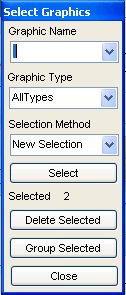 |
- Upon executing the command all graphics
elements in the view are collected.
The unique names are populated in a combo box and the user can select
a name from the list or type one. If the Graphic Name box is left
empty, all graphics will be considered in the selection criteria.
- The types of available graphics are populated in the graphic type
combo box
- There are three selection options
- New Selection
- Add To Selection
- Remove From Selection
- The user has options to quickly delete or group selected graphics.
|
All ESRI
products mentioned are trademarks of Environmental Systems Research
Institute, Inc.
Copyright: Ianko Tchoukanski |