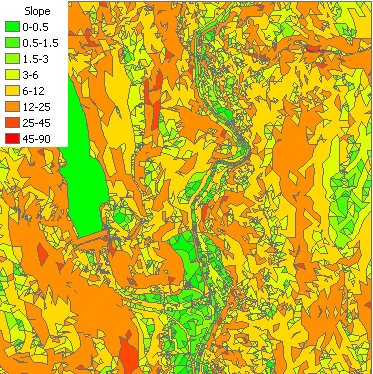
Inputs:
- A ESRI TIN or PolygonZ TIN
- Slope option
- Percent
- Degrees
- Optional: Class Breaks text file
Outputs:
- A polygon feature class
- A new field ET_SCode will be added to the polygon attribute table. The values in this field will indicate the slope groups.
Default breaks
| Slope in degrees | Slope in percents |
|
|
Breaks file format
The file consist of lines with 2 comma delimited values. The first value is the break value and the second the Group ID. The Group ID can be numeric or string, the only requirement is to be unique. The first value will define the first group, if for example the value is 5, the first group will be 0 to 5. Example text file:
| Break, Group 1, Flat 5,Low 10,Low To Moderate 25,Moderate 35,High |
The file on
the left will produce 6 groups 0 - 1 Flat 1 - 5 Low 5 - 10 Low To Moderate 10 - 25 Moderate 25 - 35 High > 35 Above High |
Command line syntax - two different toolbox tools available depending on the type of the input TIN. Check the color coding for specifics.
| ETS_GPSlopeFromEsriTIN <Input TIN> <Out Feature Class> <Slope Units> {Class Break File} |
| ETS_GPSlopeFromPolygonZTIN <Input TIN> <Out Feature Class> {Class Break File} |
Parameters
| Expression | Explanation |
|---|---|
| <Input TIN> | An ESRI TIN layer or dataset |
| <Input TIN> | A PolygonZ TIN (feature class) |
| <Out Feature Class> | A String - the full name of the output feature class. |
| <Slope Units> | A String indicating the units to be used for slope. Valid values "Degree", "Percent" |
| {Class Break File} | A String - the full name of the class breaks file. |
Scripting syntax
ETS_GPSlopeFromEsriTIN (Input TIN, Out Feature Class, Slope Units, Class Break File)
ETS_GPSlopeFromPolygonZTIN (Input TIN, Out Feature Class, Slope Units, Class Break File)
See the explanations above:
<> - required parameter
{} - optional parameter
All ESRI
products mentioned are trademarks of Environmental Systems Research
Institute, Inc.
Copyright: Ianko Tchoukanski