Inputs:
- A point dataset (Observers). The attribute table can have a numeric field which values will indicate the offset of the observers above the terrain.
- A point, polyline or polygon dataset (Targets). The attribute table can have a numeric field which values will indicate the offset of the targets above the terrain.
- A surface - Raster, ESRI TIN or PolygonZ TIN
- Options (see
Line of Sight discussion)
- Apply Earth curvature correction
- Apply air refraction corrections
- Apply radio wave corrections.
Outputs:
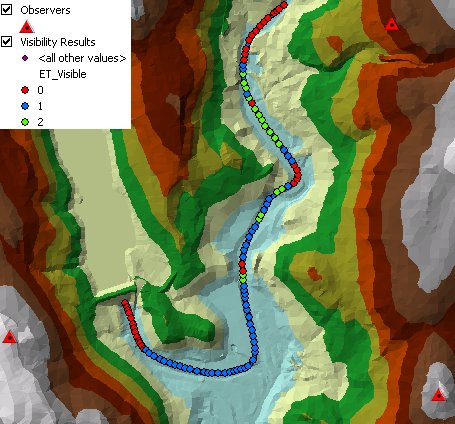
- A point feature class
- ET_Visible - the number of observers that can see the point
- All attributes of the original polygons are preserved.
Notes:
- The function is resources hungry and time consuming. Do not use it on
large datasets. Recommended is O x T < 500 where
- O = Number Observers
- T = Number Target Points
Command line syntax - two different toolbox tools available depending on the type of the input TIN. Check the color coding for specifics.
| ETS_GPVisibilityEsriTIN <Observers Dataset> <Target Dataset> <Input TIN> <Out Feature Class> <Observer Offset Field> <Target Offset Field> {Use Earth Curvature} {Refraction Correction} {Radio Waves Correction} {Cutoff Distance} |
| ETS_GPVisibilityPolygonZTIN <Observers Dataset> <Target Dataset> <Input TIN> <Out Feature Class> <Observer Offset Field> <Target Offset Field> {Use Earth Curvature} {Refraction Correction} {Radio Waves Correction} {Cutoff Distance} |
Parameters
| Expression | Explanation |
|---|---|
| <Observers Dataset> | A Point feature layer or feature class |
| <Target Dataset> | A Point or Polyline feature layer or feature class |
| <Input TIN> | An ESRI TIN layer or dataset |
| <Input TIN> | A PolygonZ TIN (feature class) |
| <Out Feature Class> | A String - the full name of the output feature class. |
| <Observer Offset Field> | A String representing the name of the field which values are going to be used as offset of the observers above the raster. |
| <Target Offset Field> | A String representing the name of the field which values are going to be used as offset of the target above the raster. |
| {Use Earth Curvature} | A Boolean |
| {Refraction Correction} | A Double representing the air refraction coefficient - Default value = 0.13 |
| {Radio Waves Correction} | A Double representing the radio waves correction coefficient - Default value = 1.333333 |
| {Cutoff Distance} | A Double representing the Cutoff distance. |
Scripting syntax
ETS_GPVisibilityEsriTIN (Observers Dataset, Target Dataset, Input TIN, Out Feature Class, Observer Offset Field, Target Offset Field, Use Earth Curvature, Refraction Correction, Radio Waves Correction, Cutoff Distance)
ETS_GPVisibilityPolygonZTIN (Observers Dataset, Target Dataset, Input TIN, Out Feature Class, Observer Offset Field, Target Offset Field, Use Earth Curvature, Refraction Correction, Radio Waves Correction, Cutoff Distance)
See the explanations above:
<> - required parameter
{} - optional parameter
All ESRI
products mentioned are trademarks of Environmental Systems Research
Institute, Inc.
Copyright: Ianko Tchoukanski