Inputs:
- A point, polyline or polygon dataset (Sources).
- The cell size of the output raster.
Outputs:
- A floating point raster. Each cell will have as a value the distance to the closest input point (Source). The extent of the output is equal to the extent of the input feature class.
Example:
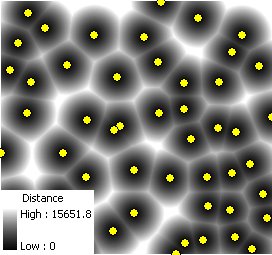 |
Notes:
- Initially the name of the output raster
defines the raster format
- no extension specified - ESRI binary GRID
- .img extension (for example raster1.img) - ERDAS IMAGINE image.
- .tif extension (for example raster1.tif - Tagged Image File Format (TIFF) image.
- The initial output raster format can be changed by selecting the desired output in the dialog.
- Currently only file based rasters are supported. Rasters cannot be stored in a GeoDatabase. After you get the desired result, you can export the raster to a GeoDatabase using the standard ArcGIS tools.
- The input point feature class must be in a projected coordinate system.
Command line syntax
ETS_GPEUCDistance <Input Features> <Out Raster> < Cell Size>
Parameters
| Expression | Explanation |
|---|---|
| <Input Features> | A Point, Polyline or Polygon feature layer or feature class |
| <Out Raster> | A String - the full name of the output raster (A raster with the same full name should not exist). The output raster type depends on the extension of the output file(see Notes above) |
| <Cell Size> | A Double representing the cell size of the output raster. |
Scripting syntax
ETS_GPEUCDistance (Input Features, Out Raster, ID Field, Weight Field, Cell Size)
See the explanations above:
<> - required parameter
{} - optional parameter
All ESRI
products mentioned are trademarks of Environmental Systems Research
Institute, Inc.
Copyright: Ianko Tchoukanski