Builds a Triangulated Irregular Network from a feature layer
Inputs:
- A feature layer (Point, Polyline, Polygon)
- Type of output - ESRI TIN or PolygonZ TIN
- An elevation field - numeric field that will be used. If the features have Z values, they can be used for elevation.
- If the output is ESRI TIN - triangulation method to be used - "Mass points" or "Hard breaklines"
- If the output is PolygonZ TIN - the Azimuth and the Altitude of the light source
Outputs:
- New ESRI TIN or PolygonZ feature class. All the polygons are triangles that comply with the Delaunay criteria. See TIN notes for more information about Triangulated Irregular Network.
- If the output is ESRI TIN and the input features are polylines or polygons, they can be triangulated as Hard breaklines.
- If the output is PolygonZ TIN, several
characteristics are calculated and added in the attribute table for each triangle.
- ET_ElMin - minimum elevation values for each triangle
- ET_ElMax - maximum elevation values for each triangle
- ET_ElMean - mean elevation values for each triangle
- ET_Slope_D - the slope (maximum rate of elevation change) of each triangle in Degrees (from 0 to 90)
- ET_Slope_P - the slope (maximum rate of elevation change) of each triangle in percents (from 0 to 100%)
- ET_Aspect - the aspect - compass direction of the slope (horizontal direction in which a slope faces) - 0 is North, 90 degrees - East, 180 degrees - South, 270 - West of each triangle
- ET_ACode - aspect categories
- N - North ( 0 to 22.5 and 337.5 to 360)
- NE - North East (22,5 to 67.5)
- E - East (67.5 to 112.5)
- SE - South East (112.5 to 157.5)
- S - South (67.5 to 112.5)
- SW - South West (202.5 to 247.5)
- W - West (247.5 to 292.5)
- NW - North West (292.5 to 337.5)
- U - Undefined - Slope = 0
- ET_AreaZ - the 3D area of each triangle
Notes :
- The process goes through several steps
- Collecting the elevation points from the source layer. If the source is a polygon or polyline layer, all the vertices are used.
- Removing duplicate points
- Creating the TIN structure
- Analyzing and storing the TIN
- In version 4.0 the TIN creation has been redesigned and can handle much bigger datasets with improved speed. On 32 bit operating systems (Windows XP 32 bit or Windows 7 32 bit) with 4 GB of RAM the function should work with no problems on datasets with up to 6 million points. On 64 bit systems bigger datasets can be processed depending on the available memory
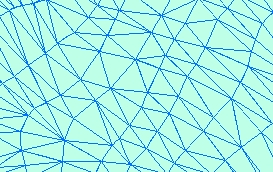
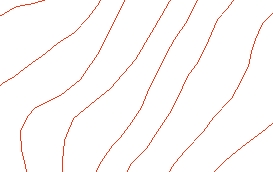
Example:
Source Layer (polyline) |
Result TIN |
|
 |
Command line syntax - two different toolbox tools available depending on the type of the input TIN. Check the colour coding for specifics.
| ETS_GPBuildESRITIN <Input Dataset> <Out TIN> <Elevation Field> <Triangulation type> |
| ETS_GPBuildPolygonZTIN <Input Dataset> <Out Feature Class> <Elevation Field> {Light Azimuth} {Light Altitude} |
Parameters
| Expression | Explanation |
|---|---|
| <Input Dataset> | A Point, Polyline or Polygon feature layer or feature class |
| <Out TIN> | A String - the full name of the output ESRI TIN |
| <Out Feature Class> | A String - the full name of the output feature class. |
| <Elevation Field> | A String representing the name of the field to be used as a source for the elevations |
| <Triangulation type> | A String - possible values are "Mass points" and "Hard breaklines" |
| {Light Azimuth} | A Double representing azimuth of the light source (0 to 360). 0 indicates North, 90 - East, 180 - South, 270 - West |
| {Light Altitude} | A Double representing the altitude of the light source in degrees (0 to 90) |
Scripting syntax
ETS_GPBuildESRITIN (Input Dataset, Out TIN, Elevation Field, Triangulation type)
ETS_GPBuildPolygonZTIN(Input Dataset, Out Feature Class, Elevation Field, Light Azimuth, Light Altitude)
See the explanations above:
<> - required parameter
{} - optional parameter
All ESRI
products mentioned are trademarks of Environmental Systems Research
Institute, Inc.
Copyright: Ianko Tchoukanski